Search results for: “sj8”

  • The SJCAM SJ8 PRO (an In-Depth Review)

    The SJCAM SJ8 PRO (an In-Depth Review)

    I’m really happy to present yet another review in a long line of SJCAM products! Thanks to SJCAM I’m now able to also test the new SJ8 PRO.

    The PRO version is the highest version of the three available designations; AIR, PLUS and PRO. This is the first SJ camera that manages to record videos in 4K at 60fps – just like the most famous brand GoPro.

    So could this camera really be the ultimate “GoPro killer”? Let’s see its specifications first!

    Photo of the SJ8 Pro "full set" after unpacking it from the box.
    The SJ8 Pro out of the box.

    Specifications for SJCam’s SJ8 Pro

    [go_pricing id=”sj8-pro”]

    Unboxing

    Accessories for the SJ8 Pro

    This camera is sold in two different packages. First, there’s the “Small Box” one containing only the camera, charging cable, and the Manual. The “Full Set” one, as the one I have received, contains all from the “small” pack, plus a lot of accessories. Adding many accessories is quite usual for SJCAM, but now you have another option there.

    Photo of everything that comes with the SJ8 Pro's full set.
    Here are all the components that come with the SJ8 Pro’s Full Set.

    The components for the SJ8 Pro’s Full Set are as follows:

    • 1 x Original SJCAM SJ8 AIR/PLUS/PRO Action Cam;
    • 1 x Battery;
    • 1 x Waterproof Housing;
    • 1 x Quick-Release Buckle;
    • 1 x Handlebar Seat Post Mount
    • 1 x Curved Adhesive Mount;
    • 1 x Flat Adhesive Mount;
    • 2 x 3M Adhesive Tape pieces;
    • 1 x Universal 1/4″ Camera Tripod Mount
    • 1 x Tripod Mount Adapter;
    • 1 x Cleaning Cloth;
    • 1 x USB-C connector Cable

    Design and build quality

    The general shape of this camera is actually not much different from the most other cameras. But when you take a closer look, you can clearly hear all the materials screaming how these are not cheap at all!

    Photo of the LCD screen on the front of the camera.
    The LCD screen on the front of the camera tends to run hot.

    All the surfaces are covered by a rubbery paint that helps with the grip. What you immediately notice is that the buttons are backlighted, which is very beautiful!

    LCD screen and touchscreen

    The SJ8 PRO has two screens. The one in front is a classic LCD screen, and it is one of the rare cameras that has a main, capacitive touchscreen on the back. I can state with pleasure that it works perfectly, exactly like the one on your phone!

    The touchscreen ability is very useful; you can go through the settings a lot faster before taking footage of your adventure. Behind this nifty function, there is a superbly intuitive and clear menu. Still, it can be an irritatingly slow chore if you want to change something during the action. It will all depend on what you need to do, and I don’t consider this feature a “malus”.

    I just want to add a little note about the front LCD, actually about its temperature. I can’t precisely tell you why, but it is always very hot! And honestly, I left it switched off during my tests, just to speed up the cooling down of the entire camera.

    Photo of the SJ8 Pro with the dual microphones circled.
    The SJ8 Pro’s dual microphones are in the locations shown above.

    Dual microphone

    Another feature that this camera has is the dual microphone. One is positioned on the front and the other on the side, and, at least in theory, this ensures a perfectly clear audio recording. But we will dwell on this in its specific section.

    Photo of camera with USB-C port open.
    The camera features a USB-C port and a screw mount for the tripod.

    USB-C port

    On the same side of the second microphone, there is the USB port. It is not your classic USB port but finally a type C! Now we can say goodbye to the struggle of trying to find the proper plug orientation!

    Jokes aside, the type C port has an advantage of a double face; both literally and figuratively! We have the comfort of an omnidirectional and resistant plug, but then there are not that many devices that use the type C! So you have to acquire your own cable if the provided one is not enough for your needs.

    Photo of SD card slot located next to the battery.
    The SD card slot is tucked next to the battery. It seems like it might get too hot in this location.

    SD card slot

    On the bottom of the camera, there is the essential bushing for an eventual tripod, or any other standard  1/4″-20 screw mount. Furthermore, in the battery door (a part of the battery itself) there is the SD card slot.

    Honestly, I don’t think this is a good idea because it is well known that the battery can be quite hot during the recording and when the camera is being recharged. That doesn’t help the SDcard much! I have noticed that during a 4K/60fps recording the battery and SDcard corner becomes too hot to hold comfortably.

    Menu overview

    This camera’s menu is very well made. With help of its touchscreen, SJCAM has managed to create one of the most intuitive menus to be found on an action camera. We can easily find everything we need:

    Photo of SJ8 Pro with the touch screen display and menu.
    The back of the SJ8 Pro has a touchscreen display and menu.

    From the top left to the bottom right we see:

    • Selected Mode
    • Recording time/Recording left
    • Mic/Battery status
    • Zoom in/out
    • Playback
    • Resolutions menu
    • Modes
    • Actual mode settings
    • General settings

    In the Mode Settings we can find every setting for any mode, like:

    • EV – +-0/+-1/3 / +-2/3 / +-1 / +-4/3 / +-5/3 / +-2
    • White Balance – Auto/Sunny day/Cloudy/Fluorescent/Underwater
    • Color – SJCAM/Flat
    • Metering – Center/Spot/AVG
    • Gyro Sensor – On/Off
    • Encoding – H.264/H.265
    • Distortion Correction – On/Off
    • Loop Recording – On/Off
    • File Size – 1min/2min/3min/5min/10min/15min/20min
    • Video Quality – Fine/Normal/Economy
    • ISO – 6400/3200/1600/800/400/200/100/MAX100/MAX200/MAX400/MAX800/MAX1600/MAX3200/MAX6400
    • Audio – On/Off
    • Time Stamp – On/Off
    • Same goes for the General menu:
    • Language – Czech/Danish/English/French/German/Hungarian/Italian/Japanese/Korean/Polski/Portuguese/Russian/ Simplified Chinese/Slovak/Spanish/Traditional Chinese
    • WiFi – On/Off
    • WiFi Frequency – 2.4G/5G
    • Format (SDcard, that is)
    • Auto Power off – Off/3min/5min/10min
    • Screensaver – Off/30sec/1min/3min/5min
    • Front Display – On/Off
    • Indicator Light – On/Off
    • Keypad Tone – On/Off
    • Brightness
    • Color Temperature
    • Volume
    • External Mic – On/Off
    • Date/Time
    • Gimbal Control – On/Off
    • Frequency – 50Hz/60Hz
    • Default Settings
    • UI – Classic/SJCAM
    • Version – v1.2.0 (2018.05.25)

    For more on navigating the menus, see the video below.

    You probably didn’t notice the lack of one little but (in my opinion), very important feature: ROTATE! With this camera, you can’t rotate the image upside down, and I don’t really get it. People like me — who use the camera upside down 90 percent of the time — are forced to make a post-production rendering so as to rotate the image. It may seem like a  little thing but it is very important! So SJ, add this to the menu, please; it’s an important setting!

    Since the Firmware v.1.2.4 (July 9th 2018) the Rotate setting is available in the Menu!

    Some advice on the settings

    After this little grumble, I’d like to offer some advice about the settings.

    First of all, this camera has both the classic H.264 as well as the H.265. The new video encoding generates smaller files with the same quality, but it is not quite like that. I have noticed an important detail loss with the H.265, so maybe you’d prefer to retain the default H.264.

    The second important thing is to ensure you have set the ISO to MAX3200 or MAX6400 because by default the camera has a setting of 100 ISO-FIX. This means that the camera makes beautiful videos in bright light, but in the low light, the images become utterly black! I had to repeat several tests for this reason.

    My last bit of vital advice is to keep the front screen switched off because it heats the camera like a BBQ and it’s not very good for anything it has inside!

    Except for these things I have no other warnings of this sort. All in all, this cam is really beautiful to see and comfortable to use.

    Video

    Honestly, it was more difficult to grasp this camera than other models. Not because it is complicated to comprehend but because, after A LOT of testing, I understood that it has been primarily created to make videos in 4K and not so much with other resolutions. Yes I know, it’s a strange thing to affirm, but let me explain.

    I’ve always said the most used resolution and frame rate is 1080p 60fps and I don’t want to go against my own theory. It is still valid but it seems SJCAM doesn’t think like me. They concentrated all the resources to develop the 4K and not the other resolution. It’s not that hard to prove because I only need to tell you is that the 1080p bitrate is only 18.000 kilobitseconds (Kbps = thousands of bits per second transfer rate).

    If you don’t know what the bitrate is, well, in simple words, this is the number of details in a video. You can go deeper into this theme by reading my guide HERE.

    Usual bitrate at 1080p on any other camera is around 30.000kbps, yet this camera has only ~18.000kbps making very light files with very ugly images. Contrary of that, the 4K with 30fps has 60.000kbps and with 60fps the transfer rate can reach 100.000kbps! Honestly, I never found such a high bitrate before and talking about the quality, it can make big difference between a “normal” camera and a good camera!

    Now I’m going to show you some classic videos with the standard resolution of 1080p 60fps compared with the 4K 60fps

    The difference is evident, the 4K on this camera is on another level compared to all the other cameras. I have no doubts about that!

    I’m quite disappointed about a couple of things here. The first one is the low quality of the 1080p resolution. I am 100% sure that it is a software problem because this camera has one of the best hardware sets on the market. It could be the direct rival of the GoPro Hero 6 and I’m not joking. That’s why I think, with some corrections in the firmware, they can make one if not THE BEST of all affordable action cameras on the market.

    The second problem is the framerate. I can’t understand why the 4K 60fps has real 60fps but the 1080p 120fps and 720 240fps resolutions have doubled frames, meaning half of those are the same. This problem can also be easily solved with a simple firmware update, and I’m confident in the future!

    Since the Firmware v.1.2.4 the 240fps issue is fixed but the problem with 120fps remained!

    After these few lines of criticism, it’s time to talk about the huge quality of the 4K and the magic of the camera’s Gyroscopic stabilization. I am truly amazed about how good this camera can stabilize videos! I think this feature can almost replace a Gimbal!

    As the first example I want to show you how it kills the shakes as a dashcam in my car:

    And the magic it can make during a bike ride:

    It uses up a little bit of field of view, but it’s worth it!

    Same place, different resolution:

    As you can see, the quality is superb, you can see every detail of every leaf. It’s just amazing! And it doesn’t have too much of speed effect!

    You also can notice the color gamut of this camera, it’s a pleasure to see all these colors faithful to reality, here’s where the high-level sensor makes the difference!

    In the low light conditions, this camera shows all its potential. With the ISO wound up to 6400, it succeeds in capturing all the light in its field of view. I was honestly impressed how good it gathers the light also on far objects, like houses or far intersections. These colors are incredibly realistic too, it’s not all yellow and dark. If there is a lighted tree, you can see the greens! It seems like an unimportant thing but it’s not. It means that the sensor knows how to do its job!

    I think this is one of the best cameras I ever tested in the night lighting conditions!

    Audio

    We can clearly find the section on the SJAM website where they advertise the presence of two microphones, built in to capture a perfect sound, even in a concert.

    SJ cam promotional photo with user recording a concert.
    This promotional image from SJCam claims the two microphones ensure perfect sound. 

    I won’t hide from you my happiness to be able to write about that because I like a lot the cameras with good sound recordings. Now, I don’t want be rude but I think my car is not as loud as a concert but the results are like this:

    Well, it’s not exactly what I expected.

    Apart from this “LITTLE” problem, with a normal audio volume, it will be quite acceptable. The high frequencies are clear, but the bass is croaking a tad. This may be good enough for recording a conversation but not good for the music. Still, during normal usage, you will not encounter any trouble.

    Photo

    Following my theory on the video quality, the photos must be good as well.  Luckily this theory is confirmed because this camera can make good photos for an action camera. OK, you didn’t expect a DSLR, but these images are good enough to be generally satisfied.

    Photo taken from overhang with the camera facing the sun.
    Photo taken with the SJ8 Pro during “the golden hour,” when the sun is low in the sky.
    Photo of empty parking lot after dark.
    Night; low-light conditions and streetlights.
    Photo taken from inside car with car control lights and street lights.
    Inside of car at night with street lights (low – level light conditions).
    Photo of shady, woodsy path with natural arbor.
    Daylight with shade.
    Photo taken of the sky with sunburst through a clearing in the woods.
    Photo taken from wooded clearing of the sky with a sunburst.
    Along the side of a path with bicycle and signs with small lettering.
    The camera captures a high level of detail.
    Photo of hilly landscape under bright blue sky.
    Hilly landscape in bright afternoon sunlight.
    Photo of hilly landscape below a blue sky with scudding clouds.
    Hilly landscape in bright afternoon sunlight with wildflowers in the foreground.
    Close-up of plants and flower with tall stalk and small yellow blooms.
    Closeup of mullein (Verbascum thapsus) wildflowers.

    Samples

    In this link you can find all the media files present in this review with the original quality, straight from the camera.

    https://mega.nz/#F!P74mWKJI!2rK4zguyDGox0HPeBkh-0A

    Battery Performance

    The battery performance is extraordinary! I read that the battery of this camera is one of the most capacious with its 1200mAh – it has 150 to 200mAh more than its rivals.

    The results of my test are hard to beat. This is a list of the main resolutions and frame rates:

    • 4K 60fps – 90 minutes (46,1 Gb)
    • 4K 30fps- 89 minutes (24,7Gb)
    • 2.7K 60fps – 70 minutes (14,8Gb)
    • 2.7K 30fps – 109 minutes (12,1Gb)
    • 1080P 60fps – 118 minutes (12,5Gb)
    • 1080p 30fps – 135 minutes (7,20Gb)
    • Charging time – 130 minutes

    Wifi and app

    Both Wifi and the app are still the same as with all the other SJ cameras. Everything works perfectly and everything is stable as it should be. In the beginning when the camera was released, the App had a few problems, mostly with the resolutions. The app resolutions simply didn’t match the camera resolutions and it was risky was to choose the 4K resolution just to find out in the end that your entire video was made at 720p. Luckily, they fixed this problem by the end of June.

    In summary

    This camera, in general, is a good camera. It could be a GREAT camera but it’s not the first time SJCAM released a camera with bugs and fixes it through its firmware updates later on. The SJ8 PRO has a good video quality and an amazing battery life, but the audio is still poor. So, this and some other tweaks must be performed in its software area. I will recommend this camera anyway because after all, it is a good camera. I hope to see in coming firmware updates all it requires, to make this camera truly A BEAST.

    Pros

    • Beautiful touch screen
    • User-friendly navigation
    • WiFi and app are impeccable
    • Incredibly long battery life
    • One of the best 4K resolution on the market
    • Great Gyro Stabilization

    Cons

    • Few bugs on the firmware
    • Frame rate issues (120fps) still remained
    • Very low bitrate at 1080P resolution
    • Bad audio quality with medium/high volume sounds


  • SJCAM Announced SJ8 Series (SJ8 Pro, Air, Plus)
    SJCAM Announced SJ8 Series (SJ8 Pro, Air, Plus)

    Ever since the SJCAM SJ8 release information got leaked to the public in August this summer, the community has been speculating on the camera specification, pricing and features quite a lot. A few days ago, we got some more inside information about the SJCAM SJ8.

    First of all, like most of us speculated, SJ8 will be released as a series of cameras. Similar to their SJ6 series (which had S6 Legend and SJ6 Air), the latest series will include several models. For now, these SJ8 variations have been revealed :

    • SJ8 Pro
    • SJ8 Air
    • SJ8 Plus

    While this article will be based on rumors and speculation, I am pretty sure that we are getting more and more accurate with our information and that soon we can expect SJCAM to reveal the final specification and products features.

    SJCAM 2017 Recap

    Before we dive into the specification and reveal some quite exciting features, let’s quickly recap what SJCAM has been doing in 2017. The company has been expanding quite rapidly. Recently they acquired the sjcam.com domain over which there was quite a lot of controversy.

    Even though I do not have an insider info on what was going on, I know that in 2014 sjcam domain was used by SJCAM distributor, who pretty much made their SJ4000 model a world-famous camera.

    Somewhere in 2015 SJCAM wanted to establish themselves as a brand and began their own marketing efforts. They grew from being a factory to becoming an affordable action camera brand. They registered their own domain name under sjcamhd.com and opened their own store. Furthermore, they invested quite a lot into marketing.

    These investments came at a cost. Some of their products were just not as good as their previous models. On Pevly, we covered nearly all of the SJCAM models ever made in past, and some of them were rated pretty poorly by our team. Their SJ7 series had some serious heating issues for instance. Lately, the situation has been improving. We were very satisfied with their SJ-Dash and the SJ6 Legend Air.

    What is more, they have been expanding their offer of affordable video cameras. The Shenzhen based company got into body-worn cameras with their SJCAM A10 and into virtual reality devices with SJ360.

    A few weeks ago, I began to notice that sjcamhd.com, which was an official company website, now redirects to sjcam.com. This can only mean that the distributor who owned the domain finally decided to sell it to the manufacturer. This is one more proof of how serious this Chinese company is about the expansion.

    SJCAM SJ8 Series

    It is pretty obvious that with SJ8 models, the company wants to challenge some quite established mid-range action camera names in the industry like Yi Technology, Xiaomi and even the highest end ones like GoPro. When we first released the news on this series, I was personally expecting that there will be only one model called SJ8, however as I mentioned, the SJ8 is actually a product series consisting of SJ8 Air, SJ8 Plus, and SJ8 Pro.

    SJCAM SJ 8 Series Technical Specification

    We did our best here at Pevly to provide you with an early version of specs table so that you know what to expect from these cameras. Please understand that specs table is compiled and based on rumors and unofficial info. Even though I am pretty confident that it’s quite accurate personally, take it with a caution.

    We will, of course, do our best to test these models out for you and verify the specs. Tables will be updated once more info is available to the general public. If you happen to have more additional information on the specs, please leave a comment below.

    [go_pricing id=”sjcam_sj8_series”]

    SJCAM SJ8 Air

    Powered by 1200 mah battery, NTK96658 processor, and a Panasonic MN34110PA, SJ8 Air model is the most basic one from the series. Its main selling point will probably be a lower price compared to the other two cameras.

    Image credits: Poshgadgets

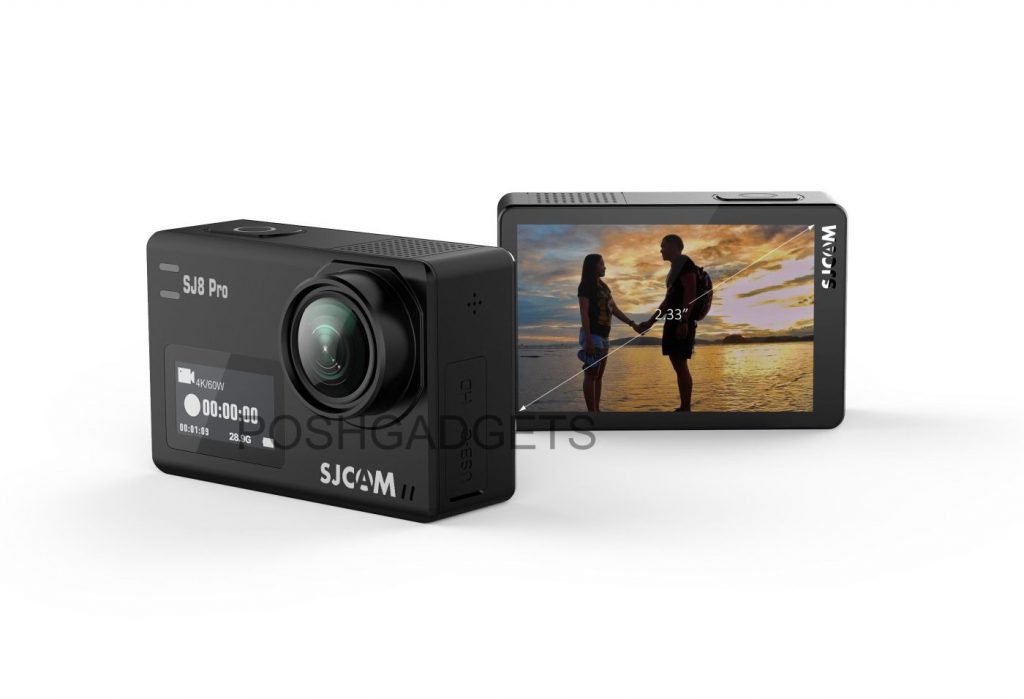
    It comes with some standard mid-range features like video stabilization, remote control compatibility, and external microphone support. Unlike the other two, this one does not have a front display, only an LCD 2.33″ retina, touch-screen at the back.

    The only advantage of the SJ8 Air is 14-megapixel image resolution. The other two can capture still images at 12 megapixels. According to the information we have, the highest recording resolution which supports Gyro Stabilization will be 1080p/60 fps.

    SJCAM SJ8 Plus

    The SJ8 Plus version tries to get the best of both worlds. It’s in the middle when it comes to both price and performance. This model has a dual screen. Front LCD display is 0.96 inch, whereas the back is 2.33-inch touchscreen. It’s biggest selling point is that it can record in 4K at 30 frames per second.

    It is possible that the gyro video stabilization will work in 4K @30fps. The SJ8 Plus is powered by a boosted Novatek NTK96683 chip and Sony Sony IMX117 image sensor. I was unable to find more information on NTK96683 chipset.

    Image credit: Poshgadget

    SJCAM SJ8 Pro

    The most advanced of all, SJ8 Pro version is the only model from the series which can record in 4K at 60 frames per second. This camera arrives with a powerful Ambarella H2-2S85 chip and improved image sensor over the plus version – Sony IMX377. The Pro has all the features and compatibility of the two cheaper models but arrives with a voice control support. This is the first SJCAM camera which will implement such feature.

    Even though there were rumors that SJ8 will support a GPS, according to the information we have now, this won’t happen. I was personally very excited about the GPS.

    Summary

    While the information is still pretty unconfirmed and scarce, we hope we managed to present the upcoming SJ8 series by SJCAM in the most comprehensive way possible. If you have more information or leaks about the cameras, please let us know in the comments. We will keep this article up to date and additional information we discover. Make sure to bookmark us and re-visit the article for updates.

    While we wait for more information on these, check out our SJCAM category for more news and reviews, and do not forget to take a peek at our Editors’ choice – Best Action camera list.

    The images from this article come from this source.

  • SJCAM SJ8 4K camera LEAKED info and New SJ360+
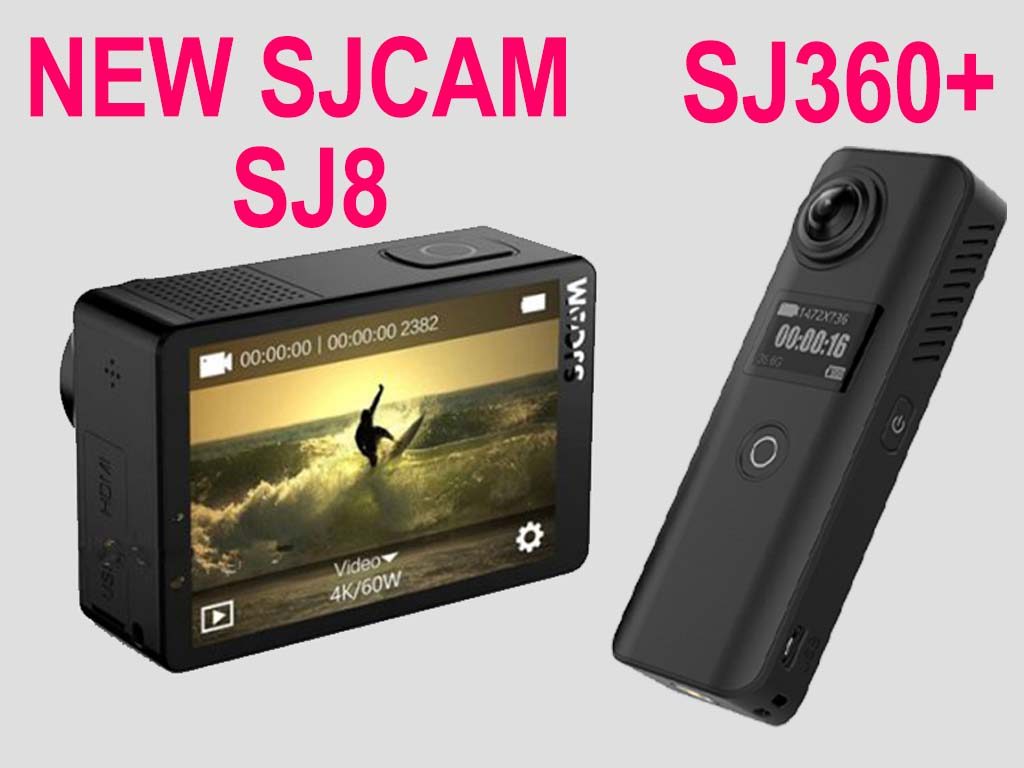
    SJCAM SJ8 4K camera LEAKED info and New SJ360+

    In 2014 I was quite excited when I learned about the new Chinese company called – SJCAM. Their popular camera SJ4000 proved to be one of the most successful cheap sports cameras. You might not know this, but the first article ever published on our website was about recognizing fake SJCAM cameras.

    Now 3 years after, SJCAM is no longer an unfamiliar brand. They launched a serious amount of cameras and became one of the leaders on the cheap sports camera market.Thanks to their new marketing and business model, they changed a lot of things. The company expanded quite a lot. What is more important they began launching new models monthly. Way bigger brands like GoPro, Sony or Garmin can’t keep up with this pace.

    Recently, we wrote about the release of SJ-Dash, their first ever car camera. This August, we came across some very exciting news. SJCAM announced the release of two more cameras by the end of October 2017. SJ8 and SJ360+.

    Find out the latest piece of information about SJCAM new cameras SJ8 and SJ360+  Photo credits: poshgadgets

    In this article, we’ll provide you with as much information on these two cameras as we were able to discover. Please understand that some of the info shared here, including the specs, the design, and the features are not final and are subject to change. With that in mind, let’s see which novelty SJCAM has to offer this time.

    SJCAM SJ8 4K @60 FPS

    We begin with a model which everyone is excited about – the SJ8. The information on SJ8 appeared on the poshgadgets website. They were the first to leak the photos. Once again, this is all still unconfirmed information. We’re waiting for an official reply from our contacts at SJCAMHD.

    SJ8 4K is a sports action camera which biggest feature is recording 4K videos at 60 FPS. Furthermore, it will allow EIS (Electronic Image Stabilization) in 4K @ 30 FPS. These features sound quite impressive. Only a few months ago, we did not have an action camera which supports EIS in 4K.

    The back of the SJCAM SJ8 camera prototype
    Photo credits: poshgadgets

    It is really amazing how quickly the sports camera market is progressing. YI 4K+ was a  first 4K/60fps action camera, but now we have the SJ8 and few others coming.

    SJCAM SJ8 is a successor of SJ7 Star. It’s the first dual-screen action camera which will support 4K/60 FPS.  The front screen has 0.96″. It will most probably be an OLED screen which will show the most basic information about the camera. The back screen will probably be a live-view touch screen, which will allow users to navigate through the settings and change different modes and options. The first dual-screen model which company produced was the SJ6 Legend.

    Features of the SJCAM SJ8 | Photo credits: poshgadgets

    Another notable feature of the SJ8 is the external GPS support. One of their main competitors, GitUp also announced an external GPS camera called G3 DUO. Furthermore, SJ8 will apparently be powered by Ambarella H22 processor and have Sony IMX377 image sensor.

    The camera supports voice-control, live-streaming, slow motion, RAW image mode and has distortion correction.

    SJCAM SJ8 Technical Specs

    The specs table below is based on the information we gathered online. It is subject to change and we will update as the more information becomes available to the public. Take this info with a pinch of salt.

    [go_pricing id=”sjcam_sj8″]

    SJCAM SJ8 release date and price

    So far, the release date and the retail price for the SJ8 has not been announced. It’s been speculated that the official specification for the product will be released to the public in October 2017. With that in mind, we estimate that camera will be on the market in September. This is only our blind guess.

    We will update this section when SJCAM officials give us the official information.

    SJCAM SJ360+

    An updated version of their first ever 360° cameras is called SJ360+. We reviewed its predecessor SJ360, and it proved to be a good concept with a rushed release since there were some software problems.

    Even though similar in name, the two models have nothing in common. Aesthetically, they are completely different. The new SJ360+ has a rectangular shape opposed to spherical which SJ360 had. Plus version features two lenses on both front and the back. Its shape allows users to easily hold it in hand.

    The camera has a 0.96″ screen on the front. It supports built in WiFi within 10m of range. This means you’ll be able to control the camera remotely, via your smartphone. In order to operate the camera via the WiFi, you’ll have to have a new app installed – SjCamPano. The app is already available for Android and iOS.

    SJ360+ is powered by 1700 mAh battery and can record 360° videos in full HD, 1080p. According to the manufacturer, the SJ360 camera supports 360° uploads to Facebook and YouTube. There’s no info on an image sensor, but the camera will use SJCAM A7S chipset.

    On SJCAM official YouTube channel, there’s always a video sample of the camera’s performance.

    Even though the two videos above appeared on YouTube two months, ago there’s still not much info on the camera, which probably means the manufacturer is tweaking it up, so the final output may be improved.

    The release date and the pricing for the SJ360+ are yet unknown.

    Summary

    Some, including our Pevly team, may say that launching a way to many models is not always a smart move. It can be a double-edged sword. We covered some of their cameras which proved to be rushed out to the market (SJ7 and SJ360 are just one of a few).

    On the other hand, this allows them to progress quickly. We really liked the new SJ6 Legend Air. The company has been launching improved new cameras almost monthly.

    What do you think about these two cameras? Which one would you prefer to have? Have more information to share with us? Leave a comment below, we’re eagerly waiting to hear from you.

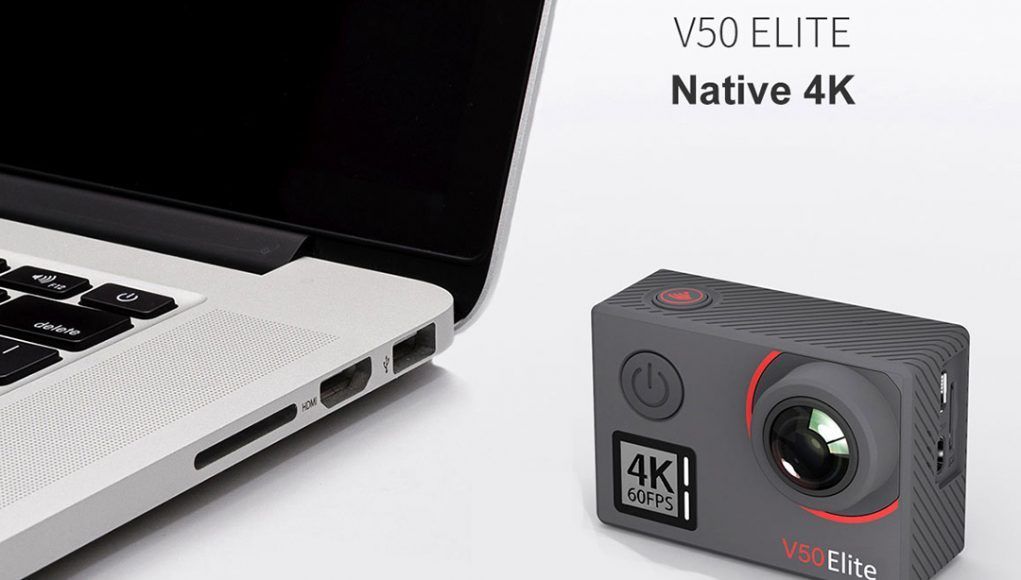
  • AKASO V50 ELITE BEST BUY?

    This camera could be a really interesting on budget camera. It can be bought from the AKASO website for only 140$ and its specs are just incredible.

    AKASO declare that it has a native 4K at @60fps and as all the other camera way more expensive, it has touchscreen on the back and the VOICE CONTROL that makes this camera reallt really interesting. Neither the SJCAM SJ8 pro has this feature and this V50 elite costs half of the price.


    We hope to test this camera as soon as possible to make a comparison with the other rivals

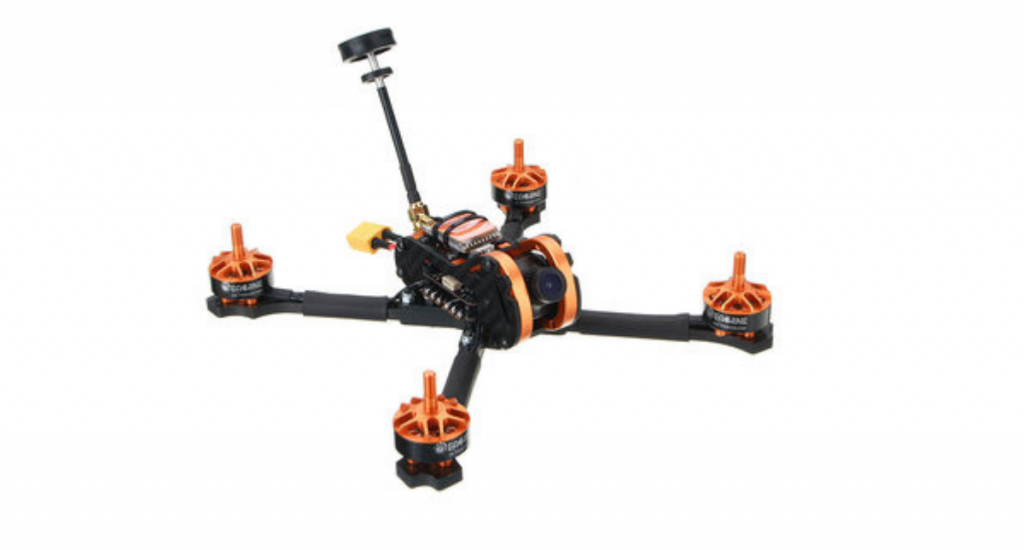
  • Eachine Tyro 99 Racing Drone Review

    Eachine Tyro 99 Racing Drone Review

    racing drones

    Drones are becoming more and more popular these days. Long ago, drones were much bigger and were used in the military. Nowadays, drones are lightweight and are mostly used for having fun, tracking objects down, and capturing videos and images. In the future, drones will be capable of delivering food, expanding internet access, and delivering vaccines and other critical medical supplies to remote locations. There are many types of drones these days, and one of those types are racing drones.

    Racing drones are built for speed and are easy to build. Drone racing is becoming a popular hobby, and people who race drones can win prizes and money. If you are interested in purchasing your own racing drone, you have come to the right place. Today, I’ll be reviewing the Eachine Tyro 99 Racing Drone, a fast and high-quality drone. I hope this article helps you decide if you should purchase your own racing drone. 

    Eachine Tyro 99 Racing Drone Features And Performance 

    There are many features that the Eachine Tyro 99 Racing Drone has. From its quick assembly to its speed, these features are what make this racing drone the perfect choice for drone racers. Let’s take a look at the features that this product has. 

    Camera

    This racing drone has a camera, which can be a very handy feature. Not all drones have a camera built in on them. When racing drones don’t have a camera on them, it can be difficult to find a way to attach a camera onto them without weighing the drone down. However, this drone already has a camera built in it. With the camera, you can take videos and pictures that you can download onto your computer and even use them to make movies. 

    Comes With Everything You Need Except For A Radio Receiver

    This drone comes with everything you need. The only thing it doesn’t come with is a radio receiver, but that should be inexpensive. The radio receiver is what allows you to control your drone. When you purchase this drone, you will receive the following pieces: 

    • 1 x 210mm frame kit
    • 2 x 2206 2150KV brushless motor CW
    • 1 x 4 IN 1 30A BLHeli_S ESC
    • 2 x 2206 2150KV brushless motor CCW
    • 1 x 700TVL CMOS camera
    • 1 x 5.8G 40CH 0mw/25mw/200mw/600mw switchable VTX
    • 2 x Battery strap
    • 1 x Customized F4 flight controller
    • 10 x Racerstar 5038 2 blade propeller CW
    • 10 x Racerstar 5038 2 blade propeller CCW

    Easy To Assemble 

    Unlike some other drones, this is a drone kit. This means that you will need to assemble it yourself. Thankfully, the assembly is not too difficult for this drone. When assembling the Eachine Tyro 99 Racing Drone, make sure the antenna is installed at the output end before powering up to avoid damaging internal components. There are many benefits to purchasing a drone kit, with the main reason being that DIY drones are inexpensive. As you will see in a little bit, racing drones that you need to assemble yourself are much cheaper than pre-assembled racing drones.

    The main disadvantage of purchasing a DIY drone is that it may not look as nice as pre-assembled racing drones. Also, drone kits can take much longer to set up than pre-assembled racing drones. Pre-assembled drones are usually ready to fly right out of the box, but with a DIY drone kit, you have to take the time to assemble it. Overall, a DIY drone is the best way to go as far as the cost is concerned. 

    Good Price

    Drones can be expensive to buy. While some only cost $30, the ones that have high-quality are much more expensive. Camera drones are especially expensive, as they already have the camera built into them. Most drones cost hundreds of dollars, if not thousands. Fortunately, the Eachine Tyro 99 Racing Drone is not very expensive. Here on Bang Good, this racing drone only costs $99. Surprisingly, the quality of this drone is really good even though it is inexpensive. 

    Brushless Motors

    Not all drones have brushless motors. Brushless motors are said to be much more durable and have much better performance than other types of motors. Brushless motors are also much more powerful than other motors. ​​Eachine Tyro 99 Racing Drone

    How To Get Started Racing Drones

    As I mentioned earlier, drone racing is becoming a very popular hobby. It doesn’t take much money to start racing drones, and you may end up winning prizes. If you are interested in joining the world of drone racing, read these tips before you get started. 

    Join the Drone Racing Community

    To begin, get familiar with the drone racing community. Check out USDRA and the Academy of Model Aeronautics for information on racing drones. Next, visit parks and other locations where drone pilots are. You may want to go to some drone races as well. Study how they fly their drones and do some research before you get started on racing your own drones.

    Purchase Your Racing Drone

    Next, you’ll need to purchase your racing drone. You must consider if you want a pre-assembled drone or a DIY drone kit. The drone that I reviewed today is a great option. It is easy to assemble and it has high speed. 

    Practice Using Your Racing Drone

    In order for you to become a great drone racer, you must first practice flying it. Make sure you practice flying the drone that you will be using at the race. Therefore, you will be used to it, as each drone is unique and functions differently. 

    Complete Your First Race

    Once you feel confident about your drone flying skills, it is time for you to enter your first drone race. Decide if you want to try a local drone race or if you want to travel to a race far away from your home. Make sure you sign up for it well in advance and don’t forget to review the list of rules. Arrive at the race early so that you can listen to any other rules and instructions. Don’t expect to win at the first drone race, but instead try the best you can and learn from your mistakes. 

    Common Questions For The Eachine Tyro 99 Racing Drone

    Although I have covered a lot of information on this racing drone, you may still have some questions. In this section, I’ll go over the top questions and their answers for the Eachine Tyro 99 Racing Drone.

    Where Can I Get An Instruction Manual?

    There is no instruction manual in the kit. In order for you to get an instruction manual, you can download the instructions here or you can check out Youtube for tutorials. 

    Can I Add A GPS To This Racing Drone?

    Yes, you can add a GPS to the Eachine Tyro 99 Racing Drone. 

    Is the Controller Included?

    Yes, the controller is included. However, you will have to purchase a radio receiver in order for it to work. 

    Eachine Tyro 99 Racing Drone Conclusion

    I hope this review of the Eachine Tyro 99 Racing Drone has helped you decide whether this racing drone is a good option for you or not. Racing drones are becoming more and more popular these days. There are many races where you can go and race your drones at. In this article, I gave some tips for racing your drone. As for the Eachine Tyro 99 Racing Drone, it is a high-quality drone built for speed. The assembly is very easy and it has many unique features. The price is very good for what you get. If you are interested in purchasing this drone, click here to learn more about it. 

    You can also use the coupon code “rchobbies8” to get a special discount 🙂

  • SJCAM or SJ SCAM? Difference between the real and a fake camera
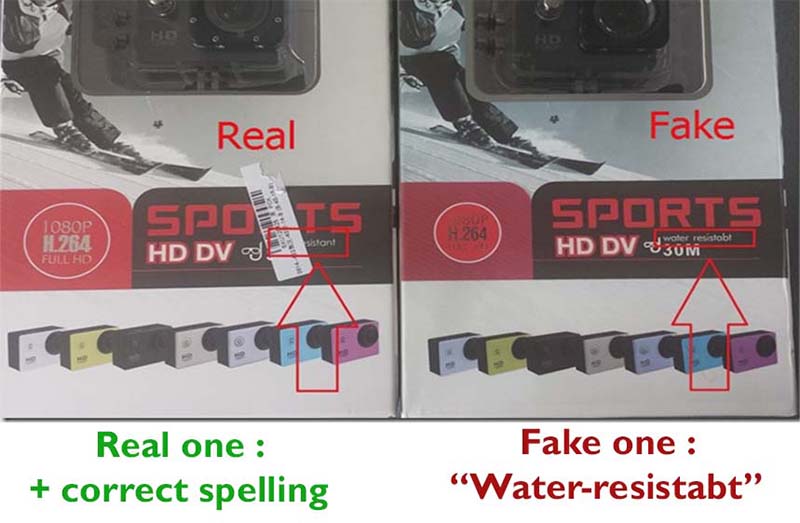
    SJCAM or SJ SCAM? Difference between the real and a fake camera

    SJCAM is one of the leading manufacturers of action cameras. Although, their cameras are also commonly referred to as SJCAM. Being that SJCAM is a Chinese manufacturer who produces action cameras that work very similarly to a GoPro, the brands are often compared. The former is almost always accused of “copying” the latter.

    The funny thing is, and most people might not know this, is that there are fake SJCAM cameras out there. Some might say: “Wow, so what? There is a copy of a copy? Isn’t SJCAM a copycat of a GoPro?”

    Not really.

    What is an SJCAM?

    This Chinese company might have similarities with GoPro in terms of design, but they never really infringed copyrights of GoPro. They use their own software, lenses, logo, etc.

    And does it say GoPro on them? No. So stop saying it’s a GoPro copy!

    After all, when a brand comes up with an idea that sells, it is evident that others will try to use it. This is how the tech market works–DVD, DVIX, iPhone, to name a few. All of these products got re-invented one way or another.

    When a company invents something profitable, smaller companies try to find a hole in it and satisfy the demand of customers. SJCAM found a hole in GoPro–price.

    For some people (including myself) the big brand camera was way over my budget, so I tried a cheaper version, and guess what? I loved it. For the sake of argument, here’s a brief comparison between the two.

    SJCAM vs GoPro

    With regards to video quality, GoPro used to be the clear winner. However, more recently, even the GoPro Hero 6 falls short of the new SJ8 PRO’s video quality. Most importantly, a GoPro Hero 6 can cost you twice the price of an SJCAM.

    During an actual video recording, GoPro’s advanced video stabilization features used to undermine SJCAM’s lack thereof. However, recent models of the latter are now equipped with a Gyro stabilization mechanism that strongly competes with GoPro’s stabilization performance.

    Take a look at some of these SJCAM models and see how they can easily be some of the best budget-friendly action cam alternatives.

    SJCAM 5000x Elite

    The fifth version from the SJ5000 series is the first model to feature Sony’s IMX078CQK 12MP image sensor. It is also equipped with a 7 glass wide-angle lens, video stabilization feature, Novatek NTK96660 processor, and a 2-inch LCD screen. It is powered by a 900mah Li-Ion battery and supports a 32GB memory card.

    Other interesting features of this model that are not found in the older versions include the underwater mode, slow-motion, and long exposure.

    SJCAM SJ6 Legend

    This is the first model of SJCAM to feature a 2-inch touchscreen display. It is equipped with a Novatek 96660 chipset and a Panasonic MN34120PA 16MP image sensor. It is powered by a 1000mah battery and supports up to 128GB of an external SD card.

    There are nine shooting modes to choose from which includes car mode, underwater mode, photo and video time lapse, and many others.

    How to connect SJCAM to computer?

    This one’s pretty simple. All you need is the USB cable that comes with the camera or the SD card you’re using. So, you either connect the camera directly to the computer via the cable or take out the SD card from the camera and insert it into a memory card reader before installing it in your computer.

    While most people find these features not as impressive as that of a GoPro, that’s beside the point. So if you are here just to moan about SJCAM and its similarities with other brands, then I am sorry, but this post is not for you. You can leave right away.

    We are here to talk about a serious issue. It can be called a scam or a deception.

    SJCAM SJ4000 Action Camera: Real vs Fake

    If you ever wanted to purchase SJ4000, you probably saw many items listed. At first glance, they all look the same.

    You are wrong. They are not. Few companies are trying to deceive people by copying SJCAM cameras, especially the SJ4000 model.

    Photo shows 4 fake models of SJCAM SJ4000
    A nice bulk of FAKE SJ4000 cameras

    Let me give you an example. Take a look at the picture above.

    Nice bunch of action cameras. It appears that all of these are SJ4000?  Even though the title in the site you’re looking at says “SJ4000”, it’s not. This whole lot is fake or SJSCAM as I like to call it.

    Pirate cameras will malfunction in most of the cases and offer inferior video quality and overall experience. Keep reading if you do not like wasting money on crappy products.

    SJCAM SJ4000 Features

    Although this model is not the most advanced among the SJCAM cameras, it is undeniably a decent alternative to the more expensive GoPro.

    At first glance, it does look like a GoPro Hero Black. However, it actually comes in seven different colors and two variants: Wifi and Non-Wifi versions. Some of the notable features of this model include a 12MP CMOS Sensor, 1.5″ LCD Screen, the usual shooting modes plus additional settings that allow you to use it as a dash cam, webcam, and surveillance cam.

    Although the photo and video quality of the SJ4000 is not as impressive as a GoPro, it still offers a decent performance for its price.

    [amazon box=”B07C26PJMP”]

    SJCAM Review: How can I know if my SJCAM is original or fake?

    To be completely safe when buying your new SJCAM, you should be aware of the things that might be different. Things that the original camera has and a pirate copy does not have or imitates it in a pretty bad way.

    • front of the camera
    • waterproof case
    • UI (User Interface)
    • Packing
    • Software

    Front view of an SJCAM

    You should know that even the most shameless copycats will not (in most cases) copy a brands name on their camera. So do not buy models that do not have the company logo on it. In this case, you can be quite confident that your SJCAM is real if it has an SJCAM logo in the bottom left corner. This works with nearly all SJCAM models from SJ1000 to SJ5000.

    There is a catch with the SJ4000 model though.

    In case you do not know SJCAM changed their name in 2014. Previously they produced cameras under Shenzhen Hongfeng Century Technology Co name. You would agree that this lengthy name is not memorable nor eye-catching, so they had to re-brand to SJCAM.

    One of the main reason the name got changed was to make things harder for pirate firms copying their products and to be able to take legal action against them. The first release of SJ4000 did not have SJCAM logo on the front, even though it was an original.

    This was heaven for copycats. As a result, the market was flooded with fake SJ4000. The company did not brand their action cam so that everyone could have copied it shamelessly. There were more fakes than real ones.

    That’s why the second release (or later batch as people call it) of SJ4000 included SJCAM brand on the front of the camera. All the later models like  SJ4000 WiFi, SJ5000, SJ5000+, SJ6 Legend have an SJCAM logo on the front of the camera. (You can take a look at all SJCAM models on this link)

    My advice is to buy the second batch only, as the first one is too risky. You can’ t know if it’s real or not until you get it. So to avoid unnecessary expenses and stress, avoid all cameras that do not have SJCAM imprinted on the front of the camera.

    Different size of a waterproof case

    I will continue to give SJ4000 as an example since this is the only product that flooded the market and got copied. The original version of the waterproof case or housing is, and it has silver screws on it. The fake waterproof housing has similar, but not the same dimensions, and has black screws on the housing. Also, these may not be as safe to use for those underwater selfies.

    User Interface

    The difference in User Interface or the menu you use to navigate through your camera is different. However, there is a difference in menu design even among original SJ400 first and second release (the one that included SJCAM logo on it).

    SJCAM Packaging

    The boxes in which cameras are packed differ. Most obvious way to see this is to take a quick glance. You will laugh. There are tons of spelling mistakes. One of the most visible is “water-resistant” sign on the front of the box.

    Crazy I know. A spelling mistake. But it can give you a pretty good clue on whether or not you are about to buy a fake.

    Software and App

    The most reliable way to check if your action camera is genuine is to test if its compatible with the SJCAM firmware. There is no chance that a fake camera will work with SJCAM firmware. If it’s not real, it won’t work.

    If it does, then you made a good choice. If you do not want to mess up with firmware, there is an easier way to make a comparison if you have a WiFi model. Just install the SJCAM App on your device (Android or Mac) and try to connect your camera with it. If you are connected, then your camera is absolutely the real one.

    SJ4000 – COMPARISON CHART

    Since the SJ4000 model is one that is really hard to make a difference between real and copied one, here is a little comparison table which should sum every difference. I included the SJ4000, “SJ4000 pirate version, replica”SJ4000 WiFi version, AT200, and TourSport.

    Comparison table SJCAM400 fake, original at200 and toursport
    Comparison table

    Security check on the manufacturer’s website

    After the problems with counterfeit SJ4000 camera, SJCAM decided to fight the copycats, by adding a security code on all of their cameras. They also redesigned the package for this purpose.

    To help customers distinguish real or fake cameras, producer of these action cams, introduced a feature called Security Check on their website. Here is a link to it.

    In theory, newer batches of cameras will have a serial code which you can enter to check if your model is original or not. Be aware that this is far from perfect solution, and that it will not work on older batches which did not have a serial. However if your camera has a serial and the security check confirms its real, then you can be pretty sure your camera is genuine.

    The sealed code on the newer models looks like this.

    SJCOM code
    Image from sjcamhd.com

    So to confirm the authenticity of your camera, you have to enter the numerical values onto the SJCAM website.

    Luckily SJCAM learned from their experienced, and all later produced cameras (including the SJ4000+ Plus) have the security screech code on the boxes.

    [amazon box=”B07C26PJMP”]

    Summary of how you can detect a real SJ4000

    If you do not want to read this whole guide and prefer everything summarized here is how you can detect a real SJ4000 :

    • SJCAM logo on front (the first version of SJCAM does not have a logo and its original, still to be sure, buy the one with a logo).
    • Silver screws on a housing
    • The user interface looks like the one bellow
    • The box does not have spelling errors and looks like the one bellow
    • Software and APP compatible (you can check this only when you already purchase a cam)
    • Security check (does not work with all cameras)

    One thing you should be aware of is that these copycats make progress and it is getting harder and harder to make a difference between real and fake action camera.

    Here are some quick tips that will work when buying anything online :

    • follow your gut
    • do not be afraid to ask seller a question
    • buy from sellers with good feedback
    • buy from reputable websites that have a refund policy
    • pay with PayPal or Credit Card (since this will enable you to open a dispute and get your money back if a problem occurs)

    Where to buy original SJCAM?

    You buy SJCAM action cameras pretty much everywhere online. There are a bunch of websites, but to minimize the risk, stick with reputable ones. Here is a list of recommended stores and sellers which sell original SJCAM cameras.

    UPDATE 1/7/2017

    Since the original guide had been written in 2014, it has now been updated. Few things happened over the years, and today, it is much safer to find if an SJCAM camera is original or fake. Here are some facts.

    So far the only proven model to be faked is SJ4000.

    Recently the manufacturer upgraded the package of all SJCAM cameras. The package now has a scratch and enter the security code which you can enter on the official website to check if your camera is real or not. Be aware that sometimes even though the camera is real, codes might not work. In this case contact SJCAM directly for the assistance.

    In case your camera does not have a security code, it might be an older batch. Older and newer batches have no difference in product quality, only in package design, so do not panic. In that case, follow this guide, check for imperfections on the package and little things we showed here.

    If you want some coupons and discounts on original cameras, check out our deals and coupons page where you can find plenty of coupons from reputable stores which sell original items.

    [amazon box=”B07C26PJMP”]

    Final Thoughts on SJCAM Action Cameras

    Do you plan to get an SJCAM or you already have one? Feel free to share your experience or tell me a story if you had any problems with replicas and fake action cams.  Found a fake that is not listed here? Share it, and I will gladly update the post with more info. For more info on SJ4000 camera, check out my in-depth review.

    Please understand that I am not able to evaluate single links and tell you if your specific camera is real or not. Just follow this guide, and you will be on a right way to get a real deal, no worries.